Sell Fries Anomalies and Night Survival Guide
Match Sell Fries window, RUN INSIDE, potato eater, power, stuck robot and Giant warnings with the reported responses, limits and kitchen recovery checks.
Close the shutter for the reported dark window visitor; return to the kitchen for RUN INSIDE; interact with the potato eater or stuck helper; follow the power-box puzzle; leave Giant impact circles.
View reference image
On this page
Respond to the warning that is actually on screen
Night survival in Sell Fries! [Anomaly] depends on distinguishing a hostile window visitor, an outdoor pursuit, a production interruption, and the Giant’s marked attack. These are not interchangeable events. The official listing warns about nightfall, while the October 13 Pro Game Guides and AllThingsHow walkthroughs describe the specific responses below.
Those sources place the nighttime phase at 8 p.m. A separate Sportskeeda source excerpt reports that window anomalies can also appear during the day. Treat the clock as preparation information, not a guarantee that a daytime visitor is safe. The recommendations here are based on community reporting, not our own survival test, and current in-game prompts take priority if an update changes a response.
Prepare the kitchen before going outside
Learn the shutter interaction and the path back inside before the first warning. Know where the serving window is relative to the preparation and cooking stations. If you have bought the Window Fries Shooter, check its reload state. Both written walkthroughs warn that the machine cannot protect the window when empty.
Do not add an avoidable shopping or collection trip just because an order has finished. Check whether the next task actually needs you outside and whether the kitchen is in a state you can leave. This is our planning advice, not a claim that the game pauses while you prepare. A short, deliberate errand is easier to interrupt than a trip without a clear destination.
Coordinate warnings in a group. If someone sees a window anomaly while another player is cooking, state the event rather than a vague call for help. Assigning attention to the window or the outdoor task is a practical team habit; this site does not claim a formal job assignment system, shared weapon ownership, or universal revive rules.
Window Anomaly: close the shutter promptly
Pro Game Guides and AllThingsHow describe a dark figure at the service window asking for fries. Their direct response is to close the shutter quickly. Do not continue ordinary customer service through that signal. The Sportskeeda excerpt additionally describes abnormal red speech and warns against handing food to the hostile visitor.
Learn the current shutter prompt while you are calm. When the visitor appears, act on the warning instead of completing an unnecessary collection action first. If you have a loaded Window Fries Shooter, the two walkthroughs report that it can make the visitor leave. Keep manual shutter knowledge as part of your plan because the machine has a reload requirement.
The sources do not establish a universally tested delay before reopening, a guaranteed immunity window, or a rule that every unusual avatar is hostile. Observe the visitor and the current warning. Do not invent a fixed countdown from a single recording, and do not assume an upgrade has worked without checking the result at the window.
RUN INSIDE!: return to the kitchen
The explicit RUN INSIDE! warning is described as an outdoor shadowy pursuit. Both walkthroughs recommend entering the kitchen quickly and staying away from the doors for a short period. This is different from closing the service shutter for a visitor who is already at the window.
Know the direct route back before you collect potatoes or visit the opposite shop. If a warning appears, cancel the optional errand and return. Do not turn the pursuit into a search for an undocumented hiding spot. The supported destination is the kitchen. The available sources do not provide a tested map of alternative safe locations.
AllThingsHow also describes a darkening screen filter as a warning while outdoors at night. Treat that as a reason to return early rather than waiting to learn exactly how much time remains. We do not publish a safe outdoor duration because it has not been verified across modes, nights, perks, and updates.
Potato-eating monster: use the interaction
The potato-eating creature is reported at the conveyor, consuming produce. Both written walkthroughs describe holding the interaction until it is scared away. Its immediate effect is on your supply chain, so a kitchen that suddenly receives fewer potatoes may need inspection rather than another purchase.
Use the prompt shown on your device. Do not assume the same keyboard key on every platform, and do not replace the sustained interaction with repeated tapping unless the current game instructs you to. Confirm that the creature leaves and the supply flow resumes before returning to another task.
When threats overlap, prioritize an immediate pursuit or dangerous attack over preserving a few ingredients. That prioritization is our practical recommendation. It is not a claim that the game has a fixed official threat ranking. The creature’s reported production disruption calls for attention, but it should not make you ignore a separate warning that is already putting your character at risk.
Power failure: restore the reported power-box connection
The community walkthroughs describe an event in which the area goes dark and the player is prompted to fix the power box. Pro Game Guides places that box outside and describes a sequence of wires. AllThingsHow likewise describes reconnecting wires at a lit box. Follow the current puzzle instructions and visible connection cues.
There is no universal wire order published here. A screenshot or old description is not enough to establish that every run uses the same sequence. Inspect the box in your own session. If the game presents matching colors or another connection rule, use the displayed puzzle rather than an invented preset.
Because the reported box is outside, check other active warnings before making the trip. If you are playing with friends, communicate that you are fixing power so the window is not assumed to be unattended by accident. After restoration, verify that the production stage you need has resumed. Light returning is helpful feedback, but the purpose is also to restore the disrupted workflow.
Stuck Robot Helper: inspect the helper itself
Both written sources describe a robot that stops working and can be freed by interaction. If the conveyor goes quiet, look for a stalled helper before assuming every machine needs upgrading. A temporary interruption and insufficient collection capacity have different solutions.
Approach using a route you understand, follow the prompt, and confirm the helper resumes its job. If another threat is active outside, respond to that first. This guide does not claim that robots can always be repaired safely during every Giant attack or that interacting grants protection. The helper task remains subject to the hazards around it.
Once the robot works again, check the line downstream. A period without input can leave preparation and cooking idle even after the collection stage restarts. Give the next potato a chance to travel through before diagnosing a second equipment problem.
THE GIANT!: leave marked impact areas
The Giant is described as a large creature across the street, with an on-screen warning and circles marking beam impacts. Pro Game Guides and AllThingsHow recommend moving out of those circles and using gaps between attacks for necessary outdoor work. The Sportskeeda excerpt instead emphasizes returning inside and says weapons do not defeat the Giant.
For a learning run, use the conservative shared lesson: avoid the marked area and return inside rather than trying to fight it. This is a synthesis of the reports, not a tested guarantee that every indoor position prevents all damage. Keep watching the actual markers and movement instructions your game displays.
Do not publish a precise cast interval, damage value, first eligible night, or difficulty-specific spawn rule without current verification. Reports can describe different modes or updates. A memorable monster name is less useful than recognizing the visible warning and moving out of the marked attack.
Recover the service loop after the event
After a threat has passed, check the window, shooter ammunition, helpers, power, and the potato-to-fries chain. Fix the stage that is actually interrupted. Surviving an event does not automatically mean your next customer can be served, especially if a helper stopped or a batch was left unfinished.
Use a calm daytime cycle to repair your process before pushing farther into the key hunt. The automation guide covers the equipment dependencies, while the beginner route covers a manual sale. We do not claim a complete anomaly catalogue, a guaranteed ending route, or a current weapon tier list. These are the documented threats and responses sufficient for building a more deliberate first survival plan.
Official game media
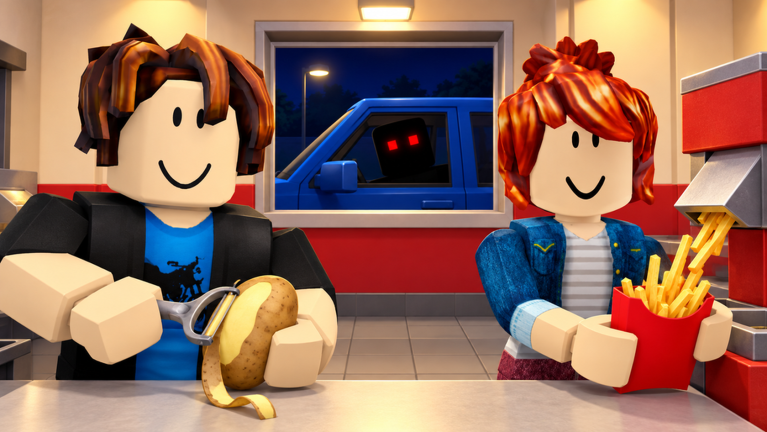
Official Roblox promotional artwork by Pharting. This image illustrates the game identity, not a tested gameplay instruction. Rights remain with the respective owners; editorial reference with attribution. Official source. For rights questions, contact linming7277@gmail.com.
Step-by-step guide
- Prepare before an outdoor errand
Know the route inside, locate the shutter and check the Window Fries Shooter reload state before leaving the kitchen.
- Match the active warning
Distinguish window service threats, outdoor pursuits, production interruptions and marked beam attacks before responding.
- Restore the service chain
After the event, inspect the window, power, helpers and each potato-to-fries stage before resuming the key search.
Video evidence
Watch creator walkthroughs alongside this guide. Check the recording date before following requirements that may have changed.
ROBLOX - Sell Fries! [Anomaly] - [Full Walkthrough]
A full recorded playthrough for the exact Pharting game. The description links the same Roblox place; useful for visual context alongside the written task guides.
ROBLOX SELL FRIES (ANOMALY)
A separate creator session provides another view of the kitchen and anomaly theme. Metadata and embed eligibility were checked; no transcript was retrieved.
Sources
Recheck these links whenever the game version, release status, or strategy changes.
- Sell Fries! [Anomaly] — official Roblox listing Pharting; official potato, cooking, service, kitchen upgrade and night warning. Checked 16 October 2026.
- Pro Game Guides — walkthrough, upgrades and anomaly responses Luka Ilic, 13 October 2026. Community reporting; details may change with updates.
- AllThingsHow — kitchen and night walkthrough AllThingsHow Staff, 13 October 2026. Used to cross-check the task sequence and responses.
- TheKacperosEN — full recorded playthrough Public gameplay recording; description matches the exact official place ID.